Data Analysis
After twelve months, the number of submissions increased, however, the web form effectively captured the data. After re-interviewing the affected Senior Leadership Team and reception, it was discovered that the number of escalations requests via LinkedIn and walk-ins had dramatically decreased.

Upon review from the Support Team, it was identified that amongst a large number of complaints, some people were trying to make new support requests without calling the support number. Also, it was identified that people also used the form to submit compliments and product feedback suggestions, such as how to improve Windows 10.

Escalation Website
The logic of the web form was revised so that first-time customers could instead book a follow-up call at their desired time. It also included a question to identify which.

View larger image of flowchart
The website aesthetic was updated as well to reflect a more modern look to match the Microsoft Brand Guidelines.
Landing Screen
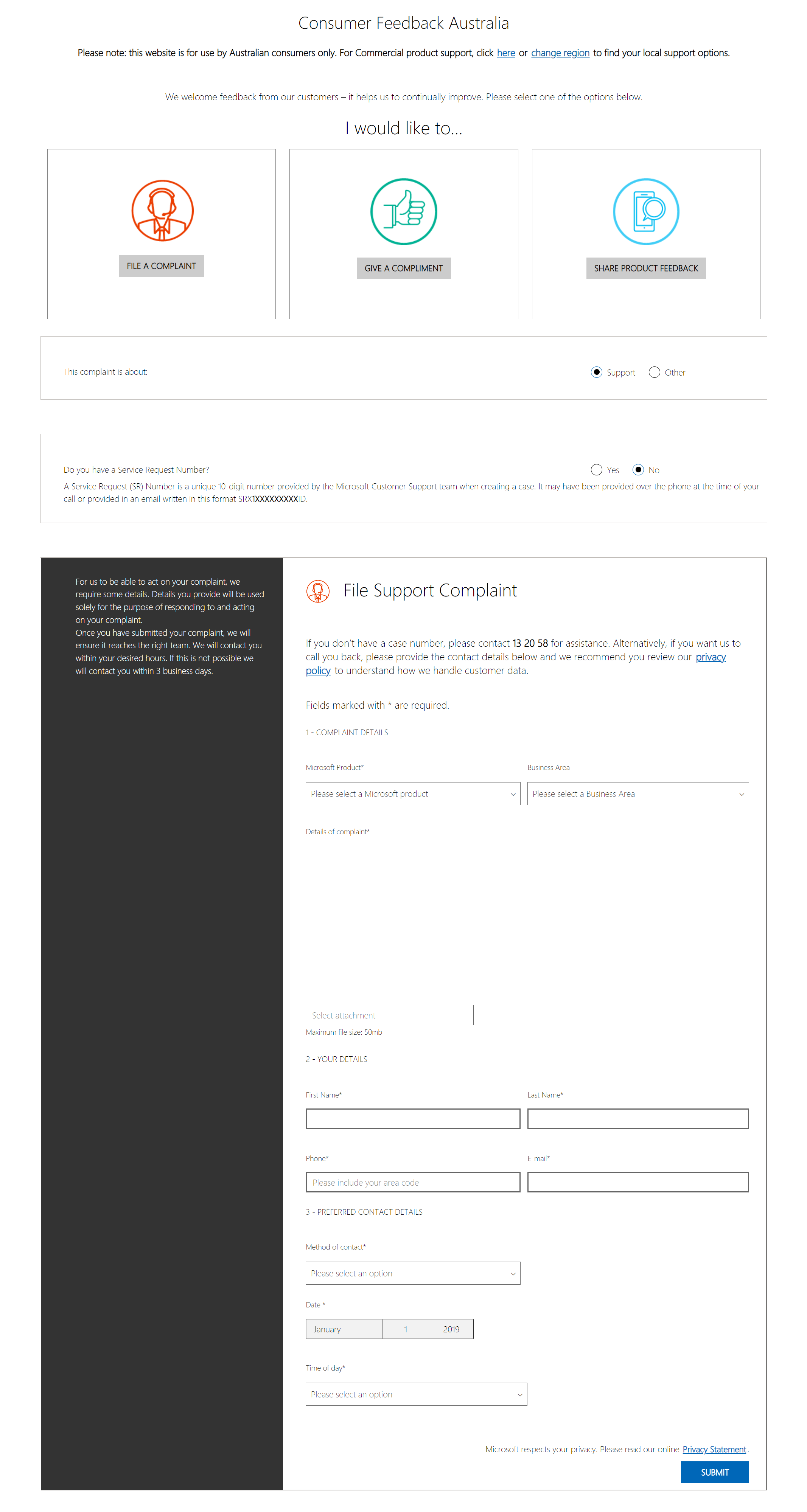
The user is met with three choices: Complaint, Compliment, or Product Feedback. This allows the support team to filter their inquiries. There are also links to change the region or receive commercial support just in case those users land on this page.
Complaint > Support > Has Service Request Number
For support complaints, an extra step has been added to filter those with or without service request numbers (SRN). For those who provide the SRN, the system also verifies that it follows the correct structure to prevent spoofing. The user is also asked for their preferred method of contact, and if they select phone, they are also asked to provide an appropriate callback time. This filtering method allows submissions on this form to be given the highest priority.
Complaint > Support > Has No Service Request Number
This form version has been added as many people used fake SRNs to try to get in contact with Microsoft Australia Support. Similar to the previous form, users are asked for their preferred method of contact and callback details if the phone is selected. In the back end, the system creates a new ticket for the support team to handle the case.
Complaint > Other
For all other complaints, users can provide feedback; however, this is treated with a medium level of priority, so contact details are limited to e-mail, without the expectation that Microsoft will contact them in return.
Compliment > Support
For those who wish to give their thanks, they can complete a separate compliment form. The Microsoft Product field remains in the form to redirected the feedback to the relevant team. The user is also able to request further contact. However, this has been hidden via a checkbox to prevent the support team from contacting too many low-priority cases.
Compliment > Other
Similar to the previous form, users can provide their compliments without an SRN and request further contact.
Product Feedback
Product Feedback is a separate form, as the data had shown that some people wanted to have their voice heard and were willing to submit a fake SRN to provide their product feedback. The support team reviews the feedback, and if approved, it is forwarded to the relevant product owner on a monthly basis.